

Publishing turns a qualified Playbook you created into a Marketplace listing that other traders can discover, evaluate, and—when you offer the option—rent or purchase.
The useful part is not simply making a Playbook public. A good listing gives potential users enough context to understand what the Playbook is designed for while TensorAlgo keeps eligible strategy parameters protected.
Before you publish
Marketplace publishing must be included in the signed-in account's current entitlement. Standard Pro and Max accounts include publishing access.
The Playbook itself must also qualify. Current qualification requires:
- trading activity across at least 10 separate trading days;
- at least one closed trade on each of those qualifying days;
- a Marketplace title;
- a public description of at least 10 words;
- at least one configured price: rental, purchase, or both.
Additional validation can apply before the listing is accepted.
Only a Playbook created by the account can be published. Rented, purchased, and system-provided Playbooks are not eligible to be resold as the user's own listing.
Build a listing that explains the value
A useful public description should help another trader understand the Playbook's purpose without exposing proprietary conditions.
Consider explaining:
- the market or trading context the Playbook is designed around;
- the type of setup it is intended to identify;
- how you personally think about the Playbook's role in a trading process;
- the available verified performance context shown by TensorAlgo;
- whether you are offering rental access, purchase, or both.
Avoid writing the description as a promise of future performance. Historical results and Marketplace statistics do not guarantee future outcomes.
Publish the listing
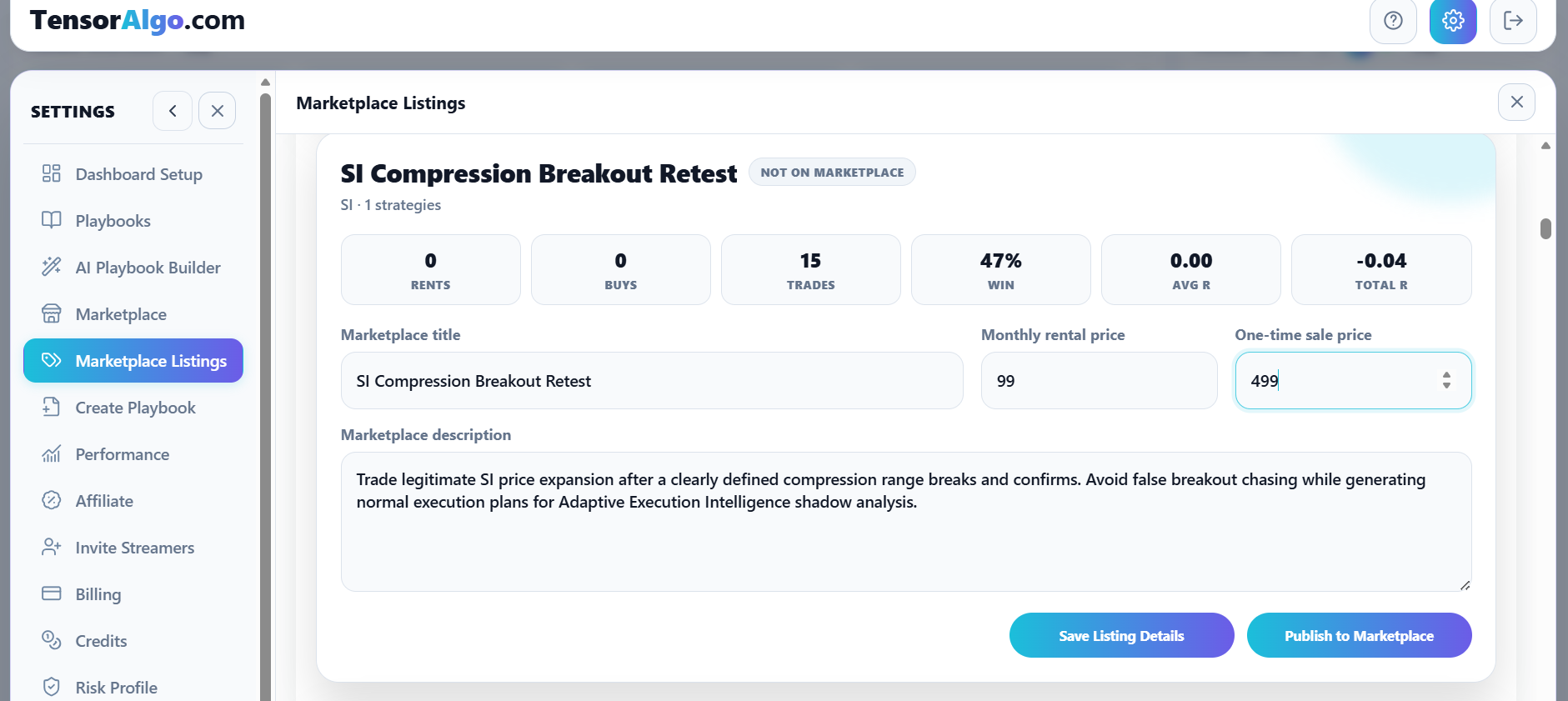
- Open Settings → Marketplace Listings.
- Choose an eligible Playbook you created.
- Enter the Marketplace title.
- Write the public description.
- Enable rental, purchase, or both.
- Enter the applicable price or prices.
- Review the listing details.
- Publish when the form passes validation.
If the Playbook does not appear in the selector, check qualification and current account publishing access before rebuilding the listing from scratch.
What buyers and renters can evaluate
A Marketplace listing can provide useful public context without disclosing the protected strategy configuration itself.
Users can evaluate the listing through the information made available by the Marketplace, the creator's description, available verified performance context, pricing, and the product's protected ownership model.
See How protected Marketplace strategies work for what remains protected after a rental or purchase.
Updating a live Playbook
Marketplace buyers and renters use a versioned Playbook rather than a creator's continuously changing working copy. This prevents a material strategy change from silently replacing the configuration another user chose.
Changing listing presentation such as its title, description, or price does not by itself create a new strategy version. A material strategy or execution change does.
When you save a material change to a Marketplace-published Playbook, TensorAlgo asks you to acknowledge the version change before the save continues. The currently published version and its historical Marketplace statistics are preserved. The edited version begins a fresh Marketplace performance window and must complete 10 separate trading days with at least one closed trade on each day before it can replace the live version.
Until that new version qualifies and you publish it, the previous Marketplace version stays live. Existing buyers and renters stay on the version they selected; a newly published version is offered as an update rather than applied silently.
This keeps statistics for materially different strategy configurations separate instead of presenting an older version's win rate, Total R, or other performance history as if it belonged to the changed strategy.
Keep the listing current
As the Playbook develops, revisit the listing so the public description and available pricing still match how you intend to offer it.
Use the available Marketplace Listings actions to update or unpublish a listing when needed. Unpublishing stops new Marketplace transactions; it does not silently remove an already-entitled buyer's selected Marketplace version. Rental access still follows the rental's active entitlement period and cancellation state.
If publishing is unavailable
Check these items in order:
- confirm Marketplace publishing is included with the signed-in account;
- confirm the Playbook was created by this account;
- confirm at least 10 qualifying trading days exist for the version you are trying to publish;
- confirm every qualifying day includes at least one closed trade;
- confirm the title is present;
- confirm the description contains at least 10 words;
- confirm at least one rental or purchase price is configured.
If you materially changed an already-published Playbook, the qualification counter shown for the candidate version is intentionally separate from the old live version's performance history.
If the Playbook appears qualified but the listing still cannot be published, open a Support Ticket with the Playbook name and the validation message shown in Marketplace Listings.
Seller earnings and settlement choices
Marketplace commission is progressive and calculated independently for each Playbook in each UTC calendar month: paid transactions 1–10 use a 50% seller rate, transactions 11–25 use 60%, and transactions 26+ use 70%. Successful purchases, new rentals, and monthly rental renewals count; failed payments do not.
New Marketplace seller earnings use a 14-day hold. After the hold they become Available and remain separate from Platform Credits until you choose to either convert them at $1 = 1,000 Platform Credits plus a 6.5% Platform Credit bonus or request cash payout with a 3.5% payout fee. Conversion is final, automatic conversion is optional and off by default, and only Marketplace earnings explicitly requested for cash enter the 1st/16th UTC payout process. See Marketplace seller earnings and commission tiers for details.
Customer cancellation and refund eligibility remains governed by the current Billing & Refund Policy, Terms of Service, and applicable transaction terms.