

Platform Credits give you a flexible prepaid balance for eligible paid actions inside TensorAlgo. Instead of starting a separate card or crypto checkout every time an eligible service is available, you can keep Platform Credits on your account and use them where the product offers that payment option.
They are separate from the AI Credits included with your plan. AI Credits are your included allowance for supported AI features; Platform Credits are a platform balance that can cover other eligible services.
What Platform Credits can be used for
Depending on the action currently offered, Platform Credits can be used for things such as:
- eligible Marketplace Playbook rentals;
- eligible Marketplace Playbook purchases;
- supported subscription or digital-service payments;
- Background Evaluation where Platform Credits are offered;
- applicable AI usage after the included AI allowance.
The checkout or payment screen for an action shows whether Platform Credits are accepted and the amount that will be charged.
Add Platform Credits to your account
Open Settings → Credits → Add Credits and choose the pack that fits how you plan to use the balance.
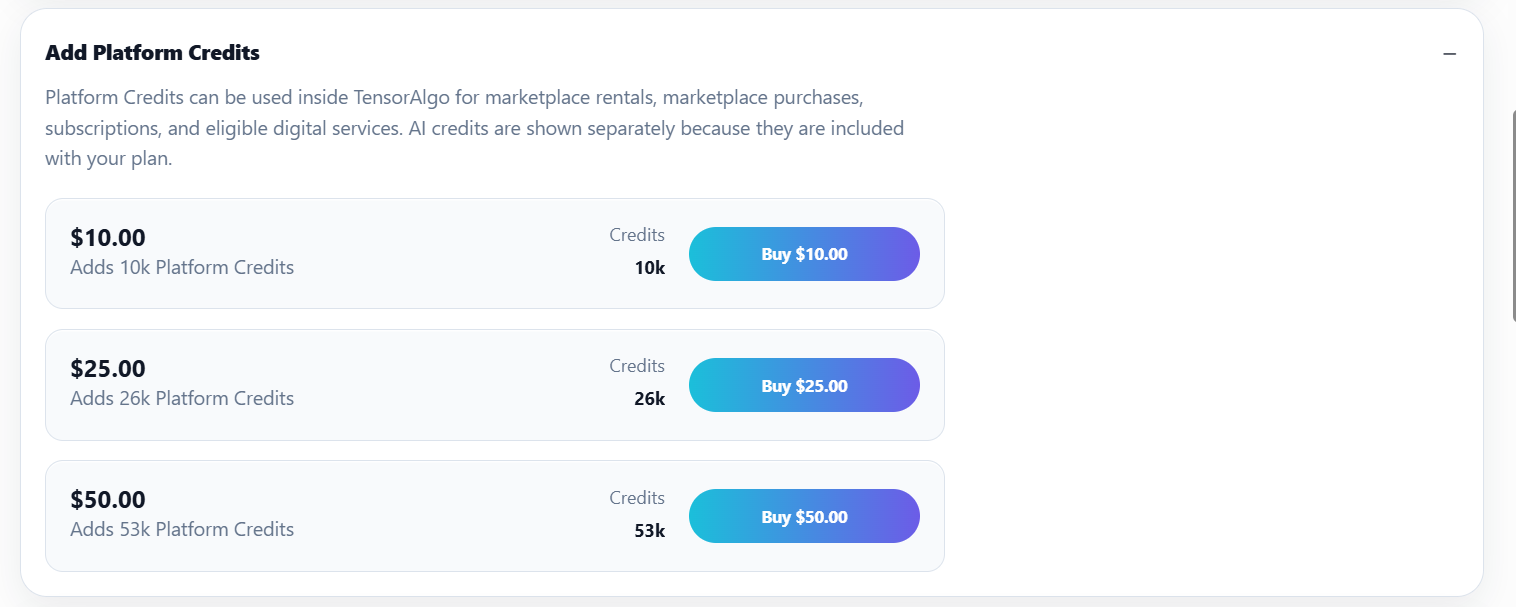
The standard packs currently configured are:
| Price | Card purchase | Crypto purchase |
|---|---|---|
| $10 | 10,000 Platform Credits | 11,000 Platform Credits |
| $25 | 26,000 Platform Credits | 28,600 Platform Credits |
| $50 | 53,000 Platform Credits | 58,300 Platform Credits |
TensorAlgo uses 1,000 Platform Credits = $1 nominal platform value as the pricing reference.
Convert Creator Earnings to Platform Credits
Eligible Marketplace seller earnings, Affiliate earnings, and Invite Streamers earnings become Available after their 14-day hold. Every Creator Earnings source uses the same conversion rule:
$1 of Available Earnings = 1,000 base Platform Credits plus a 6.5% Platform Credit bonus.
For example, $100 of Available Earnings converts to 106,500 Platform Credits: 100,000 base Platform Credits plus 6,500 bonus Platform Credits.
The 6.5% bonus is specific to converting Creator Earnings into Platform Credits. It does not change the nominal pricing reference used when Platform Credits are spent.
Conversion is final for the converted earnings and the resulting Platform Credits are not cash-redeemable. Optional automatic conversion can be enabled for future Available earnings and applies equally to Marketplace, Affiliate, and Invite Streamers earnings. It is off by default.
If a creator chooses cash instead, the Creator Earnings cash path uses a 3.5% payout processing fee rather than the 6.5% Platform Credit bonus.
Get more credits when buying a pack with crypto
When you buy a Platform Credit pack directly with crypto, TensorAlgo adds 10% more Platform Credits to the pack.
For example, the $10 pack contains 10,000 Platform Credits with the standard card purchase and 11,000 Platform Credits with the eligible crypto purchase.
This is different from both the direct crypto purchase incentive and the Creator Earnings conversion bonus. Once Platform Credits are on the account, they are spent at the normal Platform Credit price of an eligible item regardless of how the credits were originally added.
Review where your balance went
The Credits area provides activity history so you can understand how the balance changed over time. Ledger entries can show:
- credits added;
- Creator Earnings conversions;
- credits spent;
- transaction type;
- transaction date;
- balance after the transaction.
Platform Credits and AI Credits work together differently
Your included AI Credits are used for supported AI actions according to the current daily and billing-period allowance. Where Platform Credit fallback is supported, applicable Platform Credits can cover AI usage after the included allowance.
That means adding Platform Credits does not replace the AI Credits included with your plan—it gives you an additional balance for eligible paid actions.
Troubleshooting a missing balance
If a completed Platform Credit purchase or Creator Earnings conversion does not appear:
- Refresh Settings → Credits once.
- Confirm that the purchase or conversion completed successfully.
- Check whether the transaction appears in the activity list.
- If the balance is still missing, open a Support Ticket.
Include the approximate transaction time and any visible transaction reference. Do not send complete payment-card details or private wallet credentials.