

The TensorAlgo Marketplace gives you another way to expand your trading workflow: discover Playbooks built by traders and creators, compare the information available for each listing, and choose whether renting or buying makes sense for you.
Instead of starting every idea from scratch, you can explore structured Playbooks for the markets you trade and add an eligible listing to the same TensorAlgo workspace where you manage your own Playbooks.
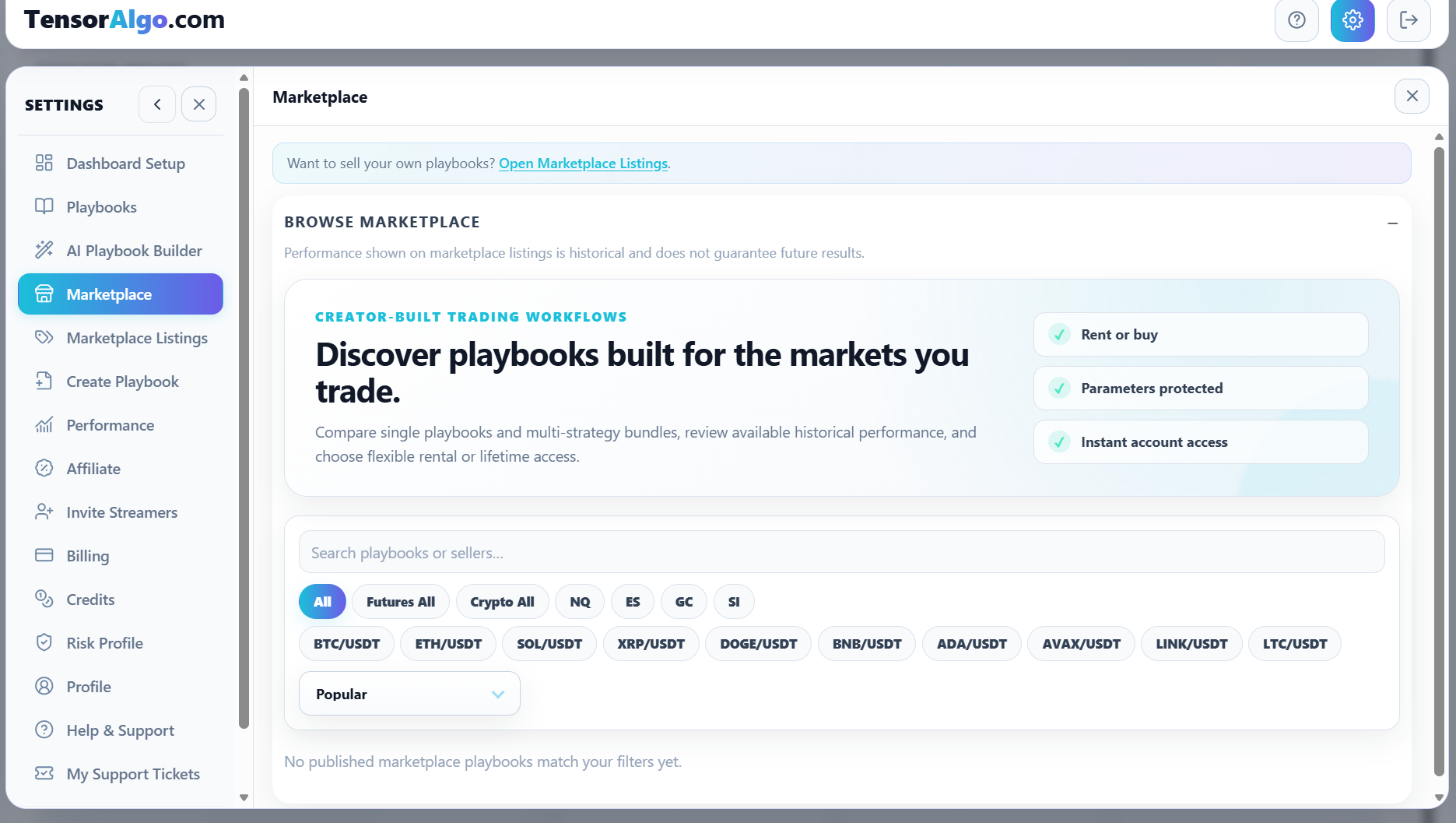
Find Playbooks for the markets you trade
Open Settings → Marketplace.
Trial users can access and browse the Marketplace, open published Playbook listings, and review the information creators make available. A Trial account cannot complete a Marketplace rental or purchase; renting or buying a Playbook requires an eligible paid plan.
Use the search field, market filters, and available sorting controls to narrow the listings. The Marketplace supports discovery across the eligible futures and crypto markets shown in the product.
This is useful when you already know what you want—for example an NQ Playbook—or when you simply want to see what creators have published for another market.
Understand a listing before you choose it
A Marketplace listing can show information such as:
- supported market;
- whether the Playbook contains one strategy or a strategy bundle;
- Marketplace title and description;
- creator information;
- available historical performance information such as closed-trade count, win rate, or Total R;
- rental and/or purchase options;
- the current price.
Historical performance can help you understand the evidence attached to a listing, but it does not guarantee future results.
The Marketplace is designed to let users evaluate the published evidence and access option without exposing the creator's protected strategy parameters, conditions, or proprietary logic.
Choose the access style that fits you
Depending on the listing, you may see one or both of these options. Trial users can review these options while browsing, but must upgrade to an eligible paid plan before completing a rental or purchase.
Rent monthly
Renting is useful when you want access for the applicable rental period without making a purchase. See Rent a Playbook for the full workflow.
Buy
Buying is useful when you want ongoing purchased access to an eligible listing through a one-time Marketplace purchase. See Buy a Marketplace Playbook for the full workflow.
Selecting either action opens the relevant checkout for an eligible paid account so you can review the current price, payment methods, and terms before completing the transaction.
Bring Marketplace Playbooks into your existing workflow
After access is granted, the Playbook becomes available through Settings → Playbooks with the ownership/access treatment applicable to it.
That means creator-built Marketplace Playbooks can live alongside:
- Playbooks you created manually;
- Playbooks created with AI Playbook Builder;
- other eligible rented or purchased Playbooks;
- system/default Playbooks provided by TensorAlgo.
You decide which Playbooks deserve active capacity based on your current plan, account state, and trading workflow.
Marketplace protection keeps creator work private
Marketplace access is intentionally different from receiving unrestricted implementation details or ownership of the creator's protected strategy logic. Protected strategy details can restrict editing, inspection, duplication, resale, and republishing.
This lets traders use eligible creator-built Playbooks while creators keep protected implementation details private.
Versions and verified reviews
Marketplace access is tied to an immutable entitled Playbook version. When a creator later publishes a materially changed version, an existing entitled user chooses whether to update; TensorAlgo does not silently replace the selected strategy version. Rental version choices remain available while the rental entitlement is active, and a purchaser keeps the versions included with the purchase entitlement.
Marketplace ratings and written reviews shown as verified are created by users with a verified Marketplace purchase or rental. Creator-owned listings cannot be reviewed by their own creator account through the verified-review workflow.
Publish your own work when eligible
Accounts with Marketplace publishing access can publish qualified, user-created Playbooks. The publishing workflow checks the Playbook against the current Marketplace requirements before it can become a public listing.
Rented, purchased, and system-default Playbooks cannot be republished by the account using them.
If you cannot find or access a listing
Check the active market filters and search text first. Trial users should still be able to browse Marketplace listings; if the Marketplace browse view itself is unavailable, refresh the dashboard and confirm the account is still in an active Trial state.
For transaction-specific help, use the dedicated Rent or Buy guide. Creator commission tiers, the 14-day hold, and the twice-monthly payout schedule are documented in Marketplace seller earnings and commission tiers. Customer cancellation and refund eligibility remains governed by the applicable transaction terms, Terms of Service, and Billing & Refund Policy.