

Background Evaluation lets an eligible Playbook continue evaluating supported market conditions while you are offline. It is useful when you want a Playbook to keep building simulated setup and lifecycle evidence instead of limiting your review to the hours when the dashboard is open.
That evidence can feed into Trade History and Trade Intelligence Center, giving you a larger record to review when you want to understand how the Playbook behaves across more completed market time.
Why use Background Evaluation?
Background Evaluation is most useful when the question is not “Did this setup appear while I was watching?” but rather “How is this Playbook behaving over a broader sample?”
For example, it can help you:
- collect more valid Playbook evidence while you are away from the dashboard;
- review behavior across more sessions;
- build a larger Trade History sample for later analysis;
- compare the Playbook's performance with other strategies in Trade Intelligence Center;
- reduce the bias of reviewing only the market periods you happened to watch live.
It does not place trades on your behalf. It extends supported evaluation and evidence collection for the eligible Playbook.
Eligibility and current price
Background Evaluation is currently available for eligible Pro and Max accounts and is purchased for one eligible Playbook. Eligible Playbooks can be owned, purchased, or actively rented.
| Plan | Price | Access period |
|---|---|---|
| Pro | $49 | 30 consecutive calendar days |
| Max | $39 | 30 consecutive calendar days |
The 30-day period is tied to the Playbook it was purchased for and cannot be transferred to another Playbook. For a rented Playbook, the rental itself must remain active. If the rental expires before the separate Background Evaluation period ends, background evaluation stops. If rental access becomes valid again while the Background Evaluation period is still active, evaluation can resume without buying another Background Evaluation period.
Turn it on for an eligible Playbook
- Open the Playbook card or Settings → Playbooks.
- Find Background Evaluation.
- Enable the control.
- Review the available payment methods and current price.
- Complete the one-time purchase.
- Confirm that the Playbook shows the active period or remaining days.
Available payment methods can include card, Platform Credits, or crypto when the corresponding provider is available.
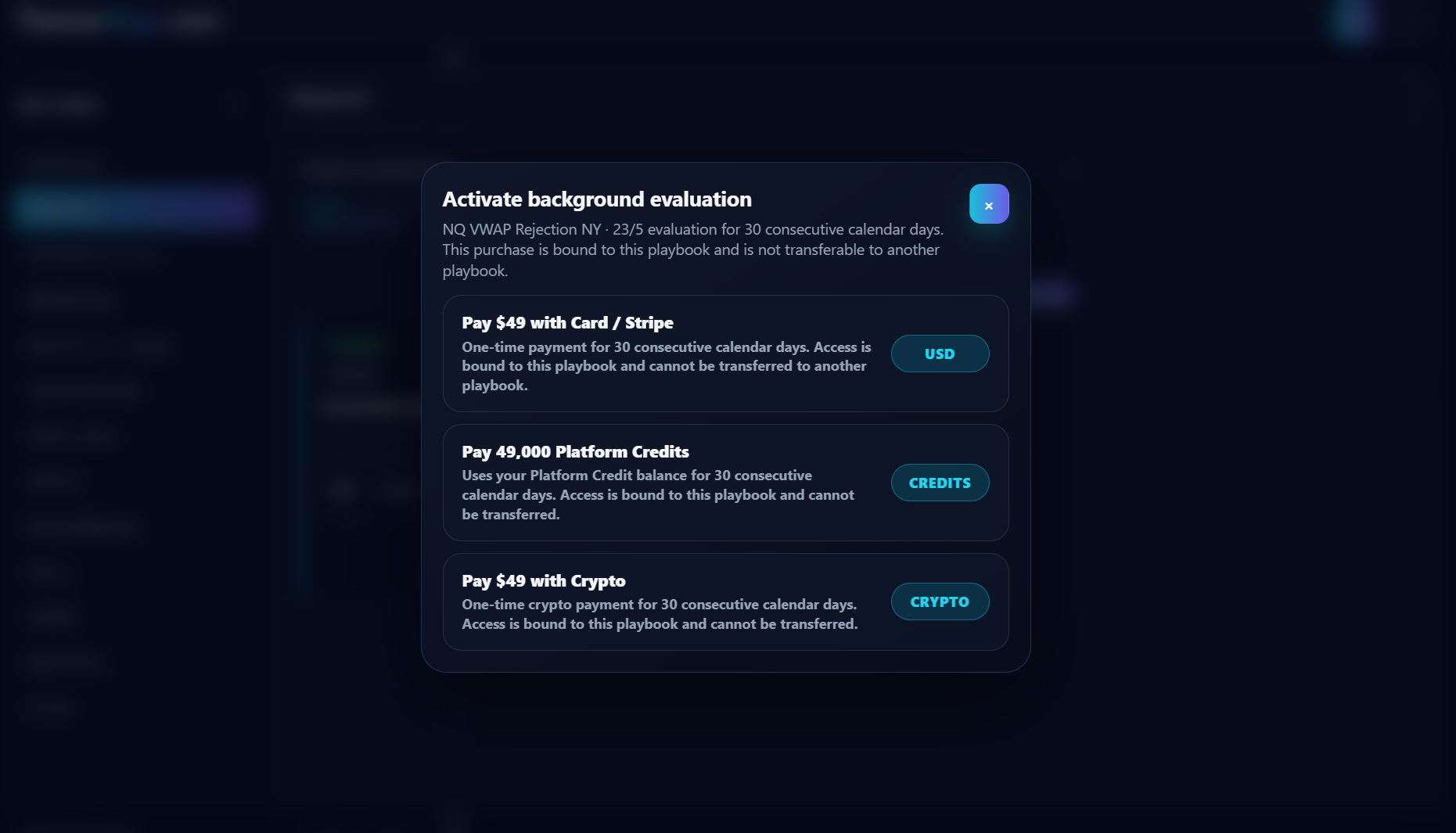
Eligible direct crypto payment receives the current crypto-payment saving shown by the product. Platform Credits use the normal Platform Credit price.
What happens while you are offline
For an eligible Playbook, Background Evaluation can continue supported evaluation during the applicable market schedule:
- supported futures Playbooks: supported 23/5 futures market hours;
- supported crypto Playbooks: continuous 24/7 evaluation.
Valid simulated setup/lifecycle evidence can be recorded so it is available later in Trade History and Trade Intelligence Center.
Receive Trade Alerts while you are away
Background Evaluation can also supply the continued Playbook evaluation needed for Trade Alerts while TensorAlgo is closed. If Browser alerts are enabled, Web Push is registered on the device, the Playbook's Alerts checkbox is enabled, and the relevant lifecycle event is enabled, a new event produced during Background Evaluation can be delivered as a Push notification.
The Push subscription itself does not keep a Playbook running. If Background Evaluation is off and the normal Playbook is no longer being evaluated, there is no new lifecycle event to send.
Use the evidence, not just the extra volume
A larger sample is useful only when you review it in context. After Background Evaluation has collected additional history:
- filter Trade History for the Playbook or market you want to inspect;
- look at wins, losses, partial outcomes, and open lifecycle records in context;
- use deterministic Trade Intelligence analytics to compare contributors, sessions, execution, risk, and sample size;
- run an optional AI review when you want a consolidated interpretation;
- refine an owned Playbook only when the evidence supports the change.
This makes Background Evaluation part of a review loop rather than just a way to generate more records.
Deactivate and reactivate during the paid period
Turning Background Evaluation off stops new background evaluation, but it does not pause the 30-day clock.
Deactivation does not:
- extend the expiry date;
- freeze remaining days;
- transfer the remaining time to another Playbook.
You can re-enable it during the same active paid period without purchasing the same period again.
Renewal
Background Evaluation does not auto-renew. When the 30-day period expires, purchase another period if you want it to continue.
If Background Evaluation is unavailable
Check these items in order:
- confirm the current plan is Pro or Max;
- confirm the Playbook is owned, purchased, or has an active rental;
- confirm the Playbook has a valid eligible configuration;
- check whether the payment option you want is currently available;
- if using Platform Credits, confirm the balance is sufficient for the displayed price.
If the purchase completed but the active period is not visible, refresh once, reopen the Playbook, and then open a Support Ticket if the state still does not match the completed payment.